
/ plugins
Your data, always correct.
Official, drop-in test reporters for every major framework. Install one package and Testhide gets rich, structured results automatically — no hand-written XML, no missing failures, no broken AI features.
One format, every framework
Each plugin emits the same Testhide Report Format v1 — a JUnit-extended XML with a stable failure id, a resolution, captured output, attachments and suite metadata. The build agent parses it identically regardless of language, and the AI models get clean features for failure-cause and flakiness detection.
What a report looks like
A complete junittests.xml with every field populated — passed, failed (with attachments, info & captured output), collection error, skipped, and a known-issue/xfail. Point your job's report_paths at this file and Testhide ingests it automatically.
<?xml version="1.0" encoding="utf-8"?>
<testsuites>
<testsuite name="pytest" timestamp="2026-05-29T10:00:00.000Z" hostname="build-node-07"
tests="5" failures="2" errors="1" skipped="1" time="0.470">
<properties>
<property name="testhide_schema_version" value="1"/>
<property name="ip_address" value="10.0.0.7"/>
<property name="hostname" value="build-node-07"/>
<property name="build" value="1042"/>
<property name="branch" value="main"/>
</properties>
<!-- PASSED — no outcome child, empty fail_id -->
<testcase classname="shop.auth.LoginTests" name="test_login_ok"
file="tests/test_login.py" line="12" time="0.100"
fail_id="" test_resolution="Passed">
<properties>
<property name="docstr" value="User can log in with valid credentials."/>
</properties>
</testcase>
<!-- FAILED — <failure> + attachments + info JSON + captured output -->
<testcase classname="shop.checkout.CheckoutTests" name="test_total_with_tax"
file="tests/test_checkout.py" line="48" time="0.200"
fail_id="3f8a1c2b9d4e5f60718293a4b5c6d7e8" test_resolution="Unresolved">
<failure message="AssertionError: expected total 110.00, got 100.00"><![CDATA[
Traceback (most recent call last):
File "tests/test_checkout.py", line 52, in test_total_with_tax
assert order.total == Decimal("110.00")
AssertionError: expected total 110.00, got 100.00
]]></failure>
<properties>
<property name="docstr" value="Order total must include 10% tax."/>
<property name="attachment" value="https://artifacts.example.com/1042/checkout_fail.png"/>
<property name="attachment" value="/var/run/testhide/1042/checkout.har"/>
<property name="info" value="{"retries": 1, "env": "staging"}"/>
</properties>
<system-out><![CDATA[POST /cart/checkout -> 200
[assert] total == 110.00 FAILED (got 100.00)]]></system-out>
</testcase>
<!-- ERRORED — import / collection failure -->
<testcase classname="shop.reports.ImportSuite" name="test_imports"
file="tests/test_reports.py" line="1" time="0.050"
fail_id="aa11bb22cc33dd44ee55ff6677889900" test_resolution="Collection Error">
<error message="ModuleNotFoundError: No module named 'pandas'"><![CDATA[
ModuleNotFoundError: No module named 'pandas'
]]></error>
</testcase>
<!-- SKIPPED -->
<testcase classname="shop.payment.PaymentTests" name="test_refund"
file="tests/test_payment.py" line="55" time="0.000"
fail_id="" test_resolution="Skipped">
<skipped type="pytest.skip" message="refund API disabled in staging"/>
</testcase>
<!-- XFAIL / KNOWN ISSUE — a failure linked to a ticket, not a hard regression -->
<testcase classname="shop.payment.PaymentTests" name="test_gateway_timeout"
file="tests/test_payment.py" line="70" time="0.120"
fail_id="bb22cc33dd44ee55ff6677889900aa11" test_resolution="Known Issue">
<failure message="TimeoutError: gateway did not respond in 30s"><![CDATA[
TimeoutError: gateway did not respond in 30s
]]></failure>
<properties>
<property name="jira" value="PAY-417 Known Issue [gateway timeout under load]"/>
</properties>
</testcase>
</testsuite>
</testsuites>See it in Testhide
Once the report lands, every test, failure message, stack trace, attachment and log shows up in the build — with AI failure-cause and flakiness analysis on top.
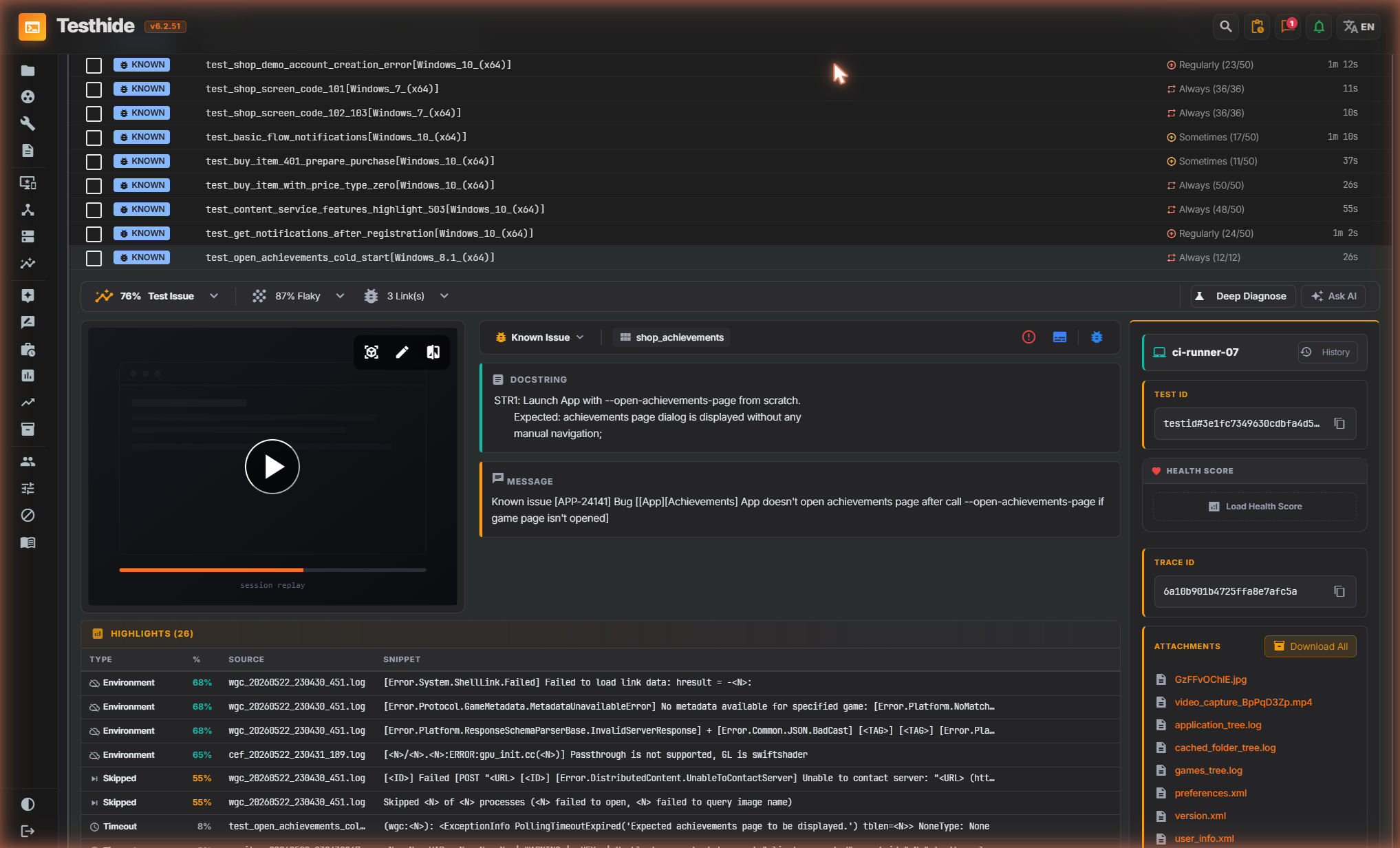
junittests.xml — failures, resolutions, attachments and captured output, parsed identically across every language.Pick your framework
Available now, with more on the way. All share the same contract and a CI conformance gate.
pip install testhide-pytest-plugin
pytest --report-xml=junittests.xmlpip install testhide-unittest-plugin
python -m testhide_unittest discover -s tests \
--report-xml junittests.xmldotnet add package Testhide.Reporting.VSTest
dotnet test --logger "testhide;LogFilePath=junittests.xml"npm i -D @testhide/reporters
# jest.config.js → reporters:
# ['default', ['@testhide/reporters/jest',
# { outputPath: 'junittests.xml' }]]npm i -D @testhide/reporters
# pick the sub-path for your runner:
# @testhide/reporters/mocha
# @testhide/reporters/vitest
# @testhide/reporters/playwrightMaven Central + Go module reporters are on the roadmap — each will emit the same format.
Supported versions
Minimum runtimes and the test frameworks each package covers.
| Plugin | Package | Runtime | Frameworks |
|---|---|---|---|
| pytest | testhide-pytest-plugin |
Python ≥ 3.8 | pytest 7+ · pytest-xdist · pytest-rerunfailures |
| unittest | testhide-unittest-plugin |
Python ≥ 3.8 | stdlib unittest (discover or programmatic) |
| .NET | Testhide.Reporting.VSTest |
.NET Standard 2.0 → runs on .NET 6 / 7 / 8 (+ Framework) | xUnit · NUnit · MSTest (via dotnet test / VSTest) |
| JS / TS | @testhide/reporters |
Node ≥ 14 | Jest · Mocha · Vitest · Playwright |
| JVM · Go | planned | — | JUnit 5 · TestNG · Go testing |
Built in
Every plugin shares the same capabilities.
Each test is written to a temp chunk and atomically merged — safe with pytest-xdist, sharded dotnet test, and Jest workers.
Skip flaky tests by id from a quarantine file (CLI flag / env / .testhide_quarantine_file).
Optional enrichment links failures to Jira issues by fail_id and maps status to a resolution.
Full field reference: Testhide Report Format v1 spec ↗
FAQ & troubleshooting
The usual setup questions.
How does the report reach Testhide?
The plugin writes junittests.xml in your workspace. Point your job's report_paths (Test reporting → report paths) at that file; the build agent parses it after the run and uploads the structured results — no extra API calls from your tests.
My report is empty / 0 tests — why?
Usually no tests were collected (wrong path/markers) or everything was quarantined. Confirm tests run without the plugin first, then check that .testhide_quarantine_file isn't deselecting them.
Where is the file written, and can I rename it?
Defaults to junittests.xml in the working dir. Override it: pytest --report-xml=PATH, unittest --report-xml PATH, .NET --logger "testhide;LogFilePath=PATH", JS reporter option { outputPath: 'PATH' }.
.NET: the testhide logger isn't found
Reference the package from the test project so its logger DLL is copied to the test output, then run dotnet test --logger "testhide;LogFilePath=junittests.xml".
Do parallel / sharded runs work?
Yes — each worker writes a temp chunk that's atomically merged on finish (pytest-xdist, sharded dotnet test, Jest workers). No corrupted XML.
How do I add build / branch metadata?
Pass suite metadata: pytest / unittest --meta build=1042 --meta branch=main, .NET ;meta.build=1042;meta.branch=main, JS reporter option meta: { build: '1042' }. They appear as suite properties (build / branch are reserved and shown specially).
Is anything sent during the test run?
No — the plugin only writes a local file. The optional Jira enrichment is the only outbound call, and only if you supply credentials. The agent uploads the report after the build.
Field-level details: Report Format v1 spec ↗